Ajna Chakra
FDE 培訓平台 / FDE Training Platform
六週培訓計畫,培養世界級的前線部署工程師
A 6-week program to build world-class Forward Deployed Engineers

什麼是 Ajna Chakra / What Is Ajna Chakra
"You are the product in the customer's eyes. Every interaction shapes their perception of the entire company."
Ajna Chakra 是為台灣國防部和泰國軍方打造的防禦情報平台。我們的客戶不是普通的企業用戶 — 他們是守護國家安全的軍事情報官員。他們的時間極其寶貴,他們的信任極其難得,他們面對的威脅是真實的。
Ajna Chakra is a defense intelligence platform built for Taiwan's Ministry of National Defense (MoND) and the Royal Thai Armed Forces (RTARF). Our customers are military intelligence officers who guard national security.
| 特色 Feature | 說明 Description |
|---|---|
| 完整氣隙部署 | 所有 AI 推理在本地執行,零外部連線 / All AI inference local, zero external connectivity |
| 三語支援 Trilingual | 繁體中文、英文、泰文的 NER 及 UI / ZH-TW, EN, TH NER and UI |
| 資訊戰模擬 InfoSim | 獨有的多代理人資訊作戰模擬引擎 / Unique multi-agent information warfare simulation |
| 知識圖譜 | Apache AGE 驅動的情報實體關係分析 / Intelligence entity relationship analysis |
| OODA 決策循環 | 自動化觀察-定向-決策-行動循環 / Automated Observe-Orient-Decide-Act cycle |
| 插件系統 | FDE 可安全擴充平台而不修改核心代碼 / Safely extend without modifying core |
| 總擁有成本 TCO | 五年成本約為 Palantir 的 1/15 / ~1/15 of Palantir over 5 years |
什麼是 FDE / What Is an FDE
FDE(Forward Deployed Engineer,前線部署工程師)是公司派駐到客戶現場的高級技術人員。你不只是工程師 — 你是顧問、培訓師、故障排除專家、以及客戶最信賴的技術夥伴。
An FDE is a senior technical professional deployed to the customer site. You are a consultant, trainer, troubleshooter, and the customer's most trusted technical partner.

| 維度 Dimension | 一般工程師 Regular Engineer | FDE |
|---|---|---|
| 工作地點 | 辦公室 Office | 客戶現場 Customer site |
| 主要對象 | 同事 Colleagues | 軍方情報官員 Military intel officers |
| 溝通方式 | 技術語言 Technical | 簡明的軍事術語 Clear military terms |
| 成功指標 | 功能完成 Feature shipped | 客戶成功使用 Customer productive |
| 部署方式 | CI/CD pipeline | 氣隙離線安裝 Air-gap offline |
| 問題處理 | 在 Slack 上求助 | 現場獨立解決 Solve independently |
FDE 三大支柱 / The Three Pillars
"An FDE is not a software engineer who happens to visit clients. An FDE is a trusted advisor who happens to write code."
主人翁思維
Ownership Thinking
你擁有整個部署的成敗。不只是程式碼,是整個結果。如果出了問題,你來修復。你不指責總部,不指責產品。
軍事同理心
Military Empathy
你的客戶保護國家安全。他們對停機的容忍度是零。在軍事部署中,停機可能意味著生命損失和威脅未被發現。
主動追求卓越
Proactive Excellence
不要等問題出現 — 預見它們。不要等需求 — 建議改進。永遠讓客戶比你來之前處於更好的狀態。
FDE 十誡 / The 10 FDE Commandments
這些是不可妥協的。記住它們。實踐它們。
These are non-negotiable. Memorize them. Live them.
-
永遠不在客戶面前說「不行」/ Never say "impossible" 說:「我們可以這樣做。」「讓我探索方案。」「目前還沒有,但這裡有替代方法。」
Say: "Here's what we can do." "Let me explore options." "Here's an alternative." -
你就是公司 / You ARE the company 你說的每一句話、做出的每一個承諾都反映了整個組織。客戶不會區分你和公司。
Every word, every promise reflects the entire organization. -
先聽,再說 / Listen first, speak second 客戶要求的和客戶需要的往往是兩回事。你只有透過深度聆聽才能發現。
What the customer asks for and needs are often different. Only deep listening reveals this. -
準備三倍 / Prepare 3x what you think you'll need 過度準備的 FDE 看起來毫不費力地專業。為你的備用計畫準備備用計畫。
The over-prepared FDE looks effortlessly competent. Backup plans for your backup plans. -
紀錄一切 / Document everything 如果沒有寫下來,就等於沒有發生。撰寫你的部署筆記時,假設閱讀者從未見過客戶環境。
If it's not written down, it didn't happen. Write as if the next FDE has never seen this environment. -
承諾少,交付多 / Under-promise, over-deliver 如果你覺得需要 2 小時,說 4 小時。然後提前交付。信任通過持續超越期望而累積。
Think 2 hours? Say 4. Deliver early. Trust compounds through exceeded expectations. -
當天回覆 / Same-day response 即使答案是「我正在調查」。沉默滋生焦慮,焦慮滋生不信任。
Even if the answer is "I'm looking into it." Silence breeds anxiety, anxiety breeds distrust. -
不留問題過夜 / Never leave a known problem unfixed overnight 軍事環境中,夜間壞掉的情報系統是不可接受的作戰風險。
In military contexts, a broken intel system overnight is an unacceptable operational risk. -
教人釣魚 / Teach the customer to fish 目標不是讓客戶依賴你,而是讓他們自給自足。「我們現在大部分事情都可以自己處理了」— 這是勝利。
Your goal is self-sufficiency, not dependency. "We can handle most things ourselves now" — that's victory. -
保持謙遜 / Stay humble 你是工具的專家,他們是任務的專家。那位上校在情報分析領域花了 25 年。
You know the tool, they know the mission. That colonel has 25 years in intel analysis.
"CEO shares the company vision, why FDEs are critical to the mission, and personal stories of customer impact. Film in the office with Ajna Chakra branding visible. 5-7 minutes, bilingual subtitles."
平台概覽 / Platform Overview
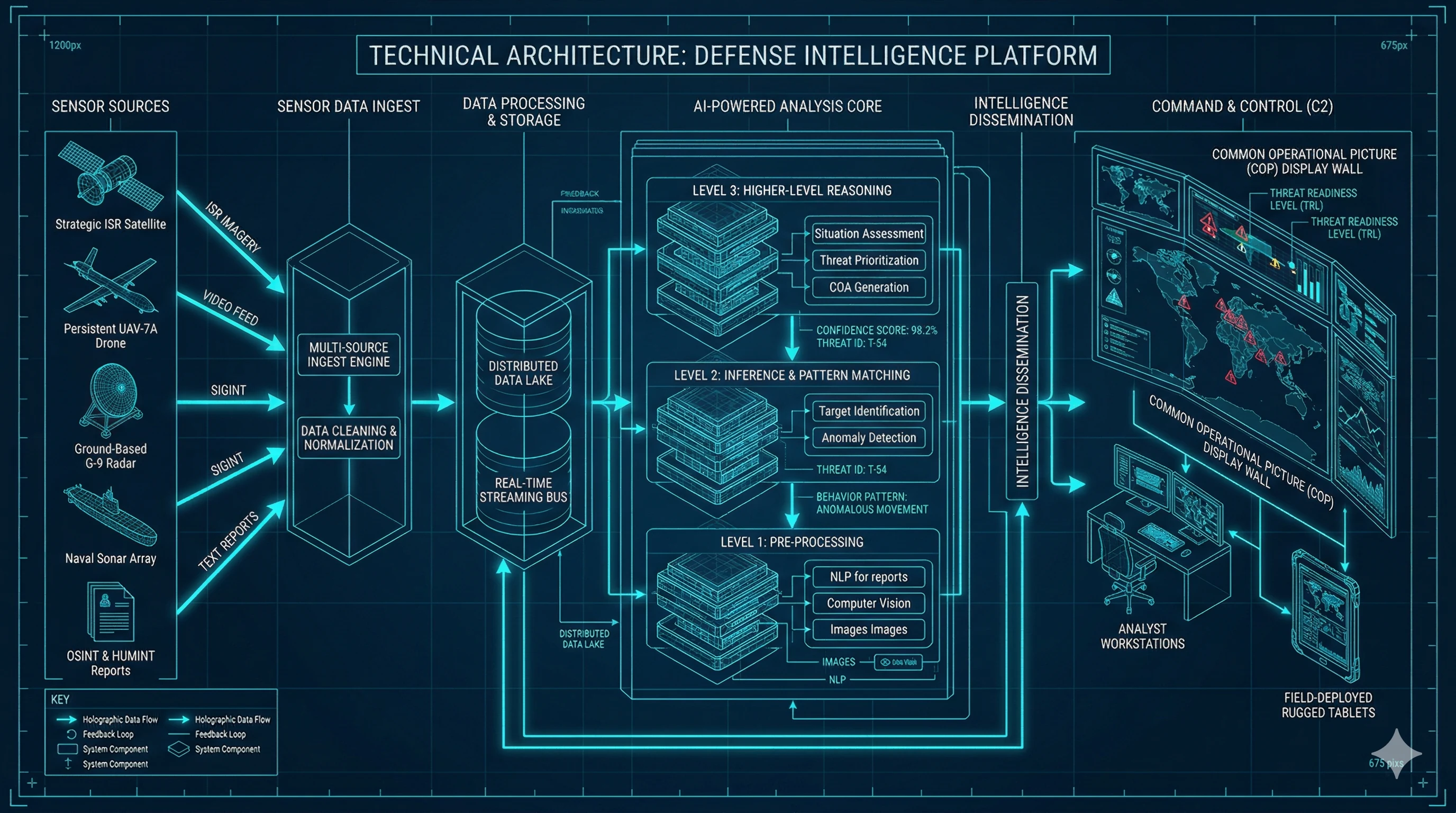
完整資料流 / End-to-End Data Flow
外部來源
連接器
Pipeline
本體論引擎
+ Vector Store
+ TimescaleDB
分析引擎
React 19
以一個解放軍戰機進入 ADIZ 的事件為例,追蹤數據從進入系統到呈現在分析官面前的完整路徑:
Trace a PLA aircraft ADIZ incursion event from ingestion to analyst screen:
- MND ADIZ Connector → scrapes MND website for ADIZ report
- Raw event → published to Redis Streams (
pipeline:raw) - Enrichment Worker → LLM extracts entities (aircraft type, quantity, location)
- Military NER → maps "殲-16" to J-16 in KB (term ID, trilingual names)
- BGE-M3 → generates 1024-dim embedding for the event text
- Resolution Worker → deduplicates entities, resolves to existing ontology objects
- Graph links created → J-16 squadron → PLA Eastern Theater → Taiwan Strait
- Analysis Worker → computes threat score (6-signal composite: 0.73)
- Alert rules evaluated →
ADIZ_HIGH_ACTIVITYalert triggered - IntelligenceBus → publishes
AlertTriggeredevent - WebSocket → pushes real-time alert to connected frontend clients
- Dashboard → shows updated threat score, timeline event, alert ribbon
21 模組走讀 / 21 Modules Walkthrough
| 層級 Layer | 模組 Modules | FDE 重要性 |
|---|---|---|
| Layer 1 連接器 Connectors | connectors/ (MND ADIZ, AIS, News, Satellite, Cyber), gateway/ | 高 HIGH |
| Layer 2 管線 Pipeline | pipeline/ (enrichment, resolution, persist), intelligence/ | 中 MED |
| Layer 3 本體論 Ontology | ontology/, services/ | 高 HIGH |
| Layer 4 NLP + 分析 | nlp/, imagery/, analysis/, graph/, search/, security/ | 中 MED |
| Layer 5 進階分析 | tactical/, loop/, abi/, killchain/, wargame/, synthesis/, infosim/, collaboration/ | 高 HIGH |
| Layer 6 LLM 引擎 | llm/ (providers: claude, ollama) | 高 HIGH |
| Layer 7 API | 28 個 REST 路由器 + WebSocket | 中 MED |
| Layer 8 前端 | React 19, MapLibre, D3.js, Recharts | 中 MED |
資料接收層 / Ingestion Layer

分析層 / Analysis Layer
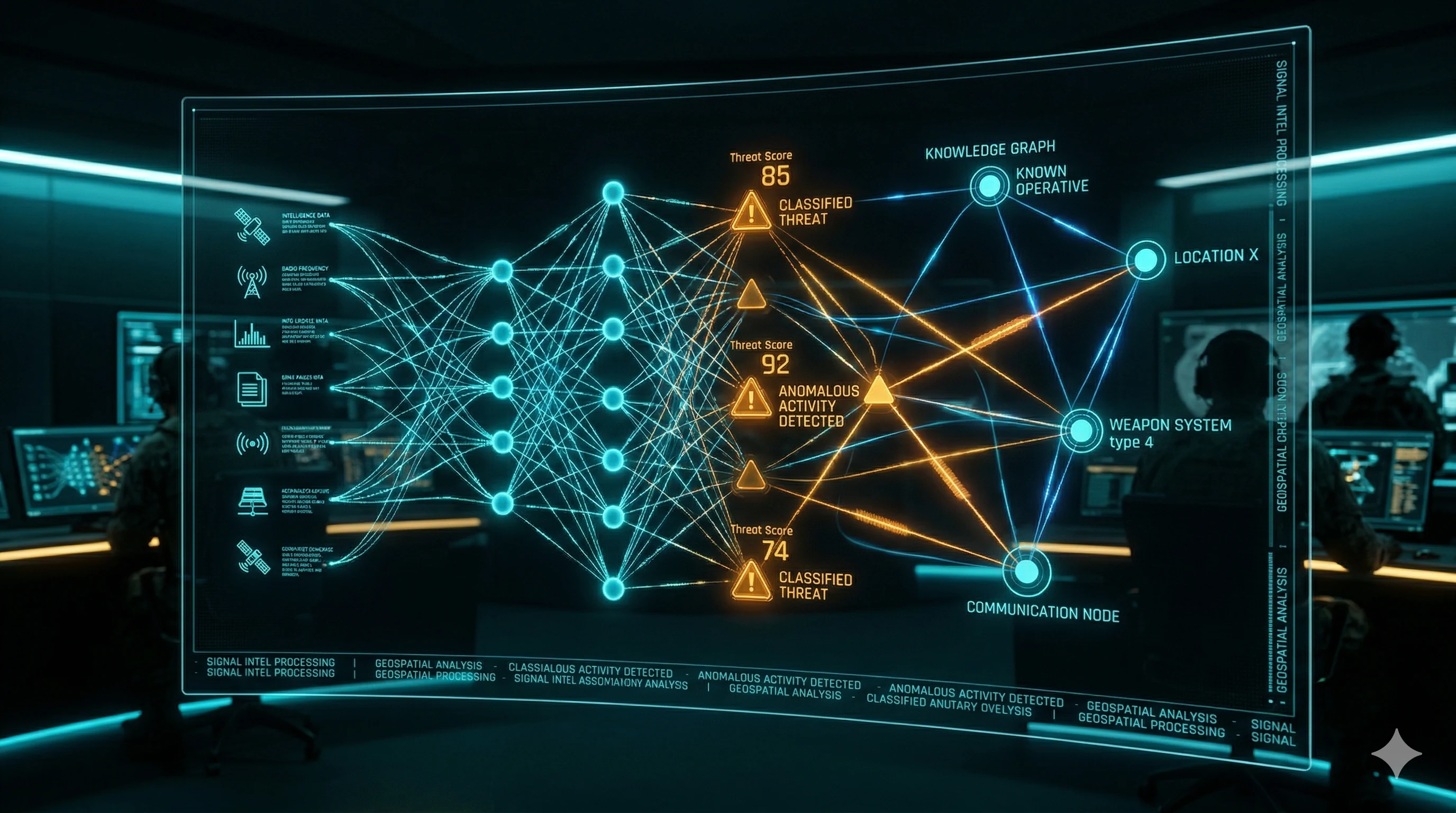
視覺化層 / Visualization Layer
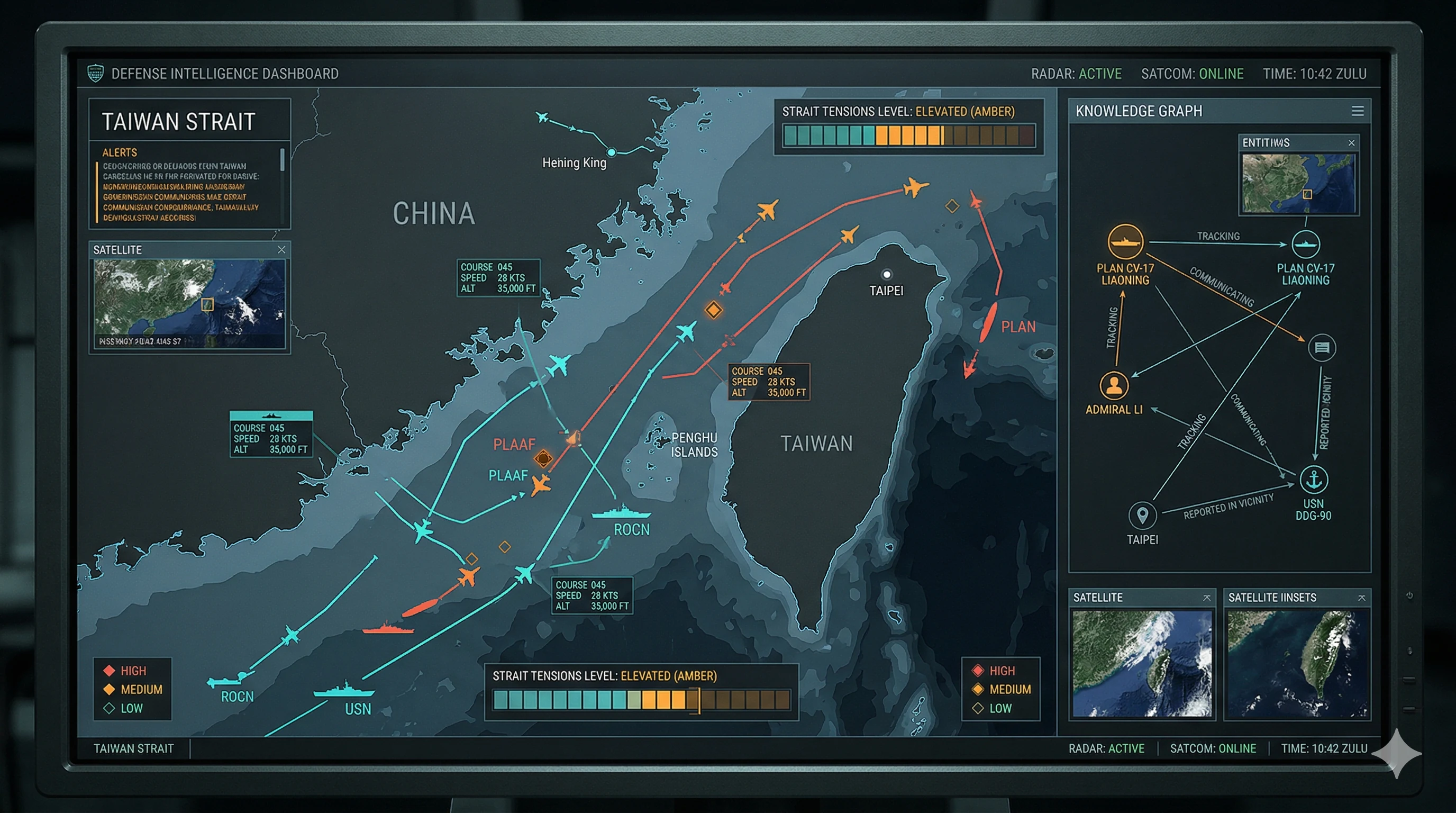
資料流與 LLM 架構 / Data Flow & LLM Architecture
LLM 提供者抽象層 / LLM Provider Abstraction
(Protocol)
開發環境
氣隙部署
未來擴充
| 模型 Model | 用途 Purpose | 大小 Size |
|---|---|---|
qwen2.5:14b | 中文情報分析 Chinese intelligence analysis | ~9 GB |
llama3.1:8b | 英文分析推理 English analysis/reasoning | ~5 GB |
bge-m3 | 多語言嵌入(語義搜索)Multilingual embeddings | ~600 MB |
llava | 圖像分析(衛星影像)Vision analysis | ~4 GB |
ReACT 簡報代理 / ReACT Briefing Agent
- PLAN: 分析任務,決定需要哪些情報
- TOOL CALL: 查詢知識圖譜、搜索相關事件 (
query_entities,search_events,graph_traverse) - OBSERVE: 分析工具返回的結果
- THINK: 判斷是否需要更多資訊
- REPEAT steps 2-4 (max iterations: 5)
- GENERATE: 產生結構化簡報
"Senior engineer walks through the entire system architecture using live diagrams and code. Show data flowing through each layer. Demonstrate with a real ADIZ incursion event. 15-20 minutes."
前端架構 / Frontend Architecture
| 目錄 Directory | 功能 Function | 對應後端 |
|---|---|---|
Dashboard/ | 威脅總覽、警報、摘要 | analysis/ |
COP/ | 通用作戰圖(地圖 + 實體) | ontology/, MapLibre |
Synthesis/ | ReACT 簡報產生器 | synthesis/ |
InfoSim/ | 資訊戰模擬 | infosim/ |
Loop/ | OODA 四象限儀表板 | loop/ |
Graph/ | 知識圖譜探索器 | graph/ |
Tactical/ | 對手側寫 | tactical/ |
Wargame/ | 兵棋推演 | wargame/ |
KillChain/ | F2T2EA 殺傷鏈 | killchain/ |
Chat/ | 自然語言查詢 | api/chat |
架構知識測驗 / Architecture Quiz
技能自評矩陣 / Skills Self-Assessment Matrix

獨立評估你在以下每個領域的能力等級。誠實是進步的前提。
Honestly assess your skill level in each area. Honesty is the prerequisite for improvement.
Python Async / FastAPI
Ajna Chakra 後端全部使用 async/await。所有 LLM 呼叫必須通過抽象層。
from fastapi import APIRouter, Depends, HTTPException
from pydantic import BaseModel
from ajna.services.ontology import OntologyService
from ajna.security.auth import require_role, Role

router = APIRouter(prefix="/api/v1/entities", tags=["entities"])

class EntityResponse(BaseModel):
    id: str
    name: str
    threat_score: float
    classification: str

@router.get("/{entity_id}", response_model=EntityResponse)
async def get_entity(
    entity_id: str,
    svc: OntologyService = Depends(),
    user = Depends(require_role(Role.ANALYST)),
):
    entity = await svc.get_by_id(entity_id)
    if not entity:
        raise HTTPException(404, "Entity not found")
    return entity
React / TypeScript
import { useQuery } from '@tanstack/react-query';
import { api } from '../lib/api';

interface Entity {
  id: string;
  name: string;
  threatScore: number;
}

export function EntityList() {
  const { data, isLoading, error } = useQuery({
    queryKey: ['entities'],
    queryFn: () => api.get<Entity[]>('/api/v1/entities'),
  });

  if (isLoading) return <div>Loading...</div>;
  if (error) return <div>Error: {error.message}</div>;

  return (
    <ul>
      {data?.map(e => (
        <li key={e.id}>{e.name} — {e.threatScore}</li>
      ))}
    </ul>
  );
}
PostgreSQL + 擴充套件 / Extensions
PostGIS 地理空間查詢
-- 找出台灣 ADIZ 內的所有實體
SELECT o.name, o.properties->>'type' AS entity_type,
       ST_AsGeoJSON(o.location) AS geojson
FROM ontology_objects o
WHERE ST_Within(o.location, ST_GeomFromGeoJSON('...'));
pgvector 語義搜索
-- 找出語義上最相似的 5 個事件
SELECT e.title, e.summary,
       1 - (e.embedding <=> query_embedding) AS similarity
FROM events e
ORDER BY e.embedding <=> query_embedding
LIMIT 5;
Apache AGE 圖查詢 (Cypher)
SELECT * FROM cypher('ajna_graph', $$
    MATCH (tc:MilitaryUnit {name: 'PLA Eastern Theater Command'})
          -[:COMMANDS*1..3]->(unit)
    RETURN unit.name, unit.type
$$) AS (name agtype, type agtype);
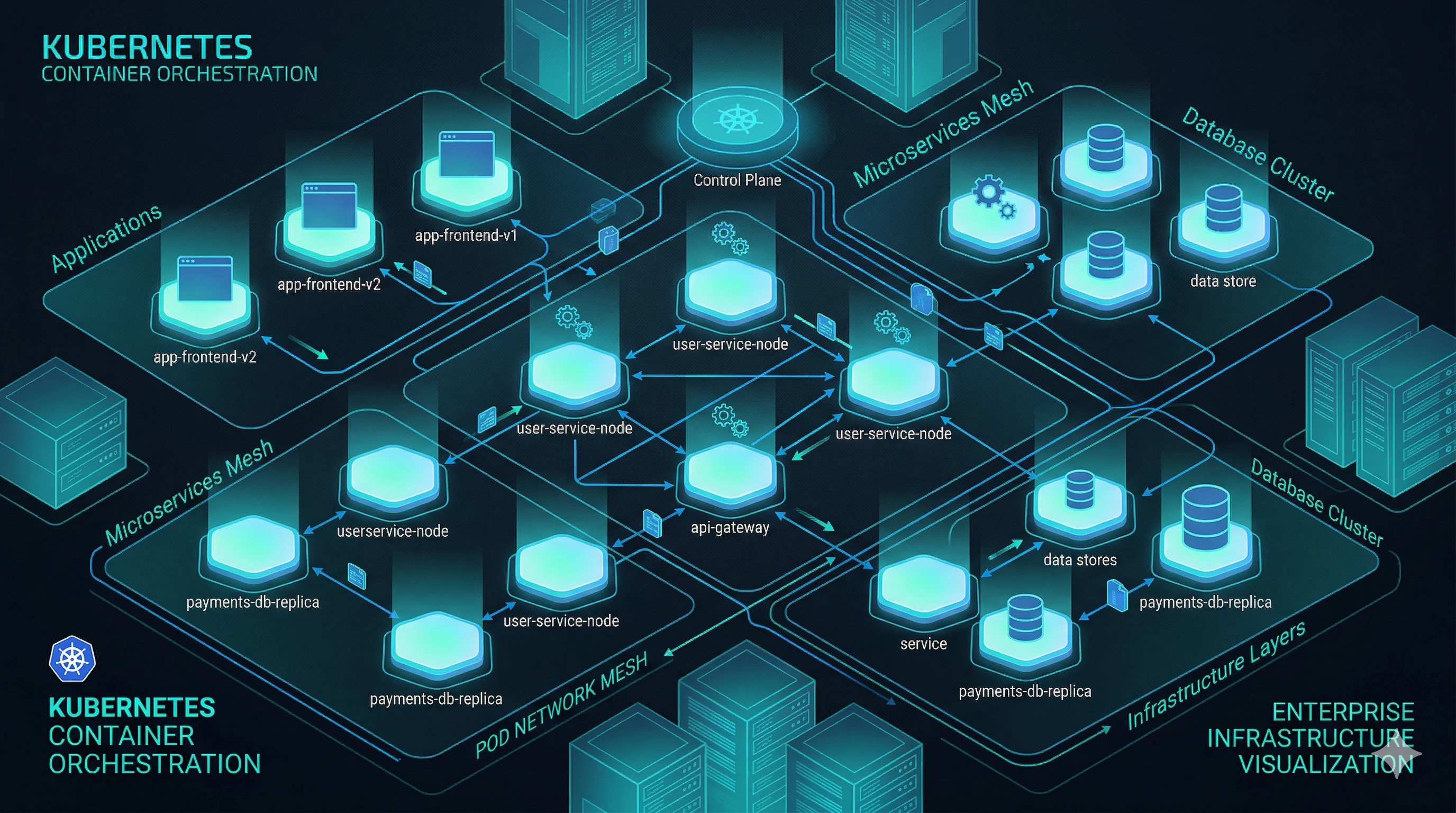
Docker / Kubernetes
# 檢查所有服務狀態
docker compose -f docker-compose.airgap.yml ps

# 查看後端日誌
docker compose logs backend --tail=100 -f

# 重啟特定服務
docker compose restart backend

# 資料庫備份
docker compose exec -T postgres pg_dump -U ajna ajna | gzip > backup.sql.gz

# Ollama 模型管理
docker compose exec ollama ollama list
docker compose exec ollama ollama run qwen2.5:14b "分析以下情報...""Screen recording of complete local dev environment setup. Show docker compose up, verify health, seed demo data, explore UI. Address common issues. 10-15 minutes."
LLM / AI 引擎
核心原則:所有 LLM 呼叫必須通過抽象層,永遠不直接呼叫特定提供者。
AJNA_LLM_PROVIDER=ollama
AJNA_OLLAMA_BASE_URL=http://ollama:11434
AJNA_LLM_MODEL_CHINESE=qwen2.5:14b
AJNA_LLM_MODEL_ENGLISH=llama3.1:8b
AJNA_EMBEDDING_MODEL=bge-m3
InfoSim 七種代理人類型 / InfoSim Agent Types
| 代理人 Agent | 角色 Role |
|---|---|
STATE_MEDIA | 國家媒體 — 官方敘事發布 |
BOT_NETWORK | 機器人網絡 — 大規模訊息擴散 |
OFFICIAL_GOV | 官方政府 — 政策聲明 |
DOMESTIC_MEDIA | 國內媒體 — 訊息放大或反駁 |
FOREIGN_MEDIA | 外國媒體 — 國際輿論 |
KOL | 意見領袖 — 影響力節點 |
CIVILIAN | 平民 — 訊息接收與傳播 |
三種部署方式比較 / Deployment Methods Comparison
| 方式 Method | 適用場景 | 節點數 | GPU | 複雜度 |
|---|---|---|---|---|
| Tier 1: Docker Compose 單機部署 |
評估、小型部署、POC | 1 | 選配 RTX 4090+ | 低 |
| Tier 2: Kubernetes + Helm 叢集部署 |
生產環境、中等規模 | 3-5 | 1-2x A100 | 中 |
| Tier 3: 軍規高可用 Military HA |
正式軍事部署 | 10-20 | 2+ A100 80GB | 高 |
Docker Compose 部署 / Docker Compose Deployment
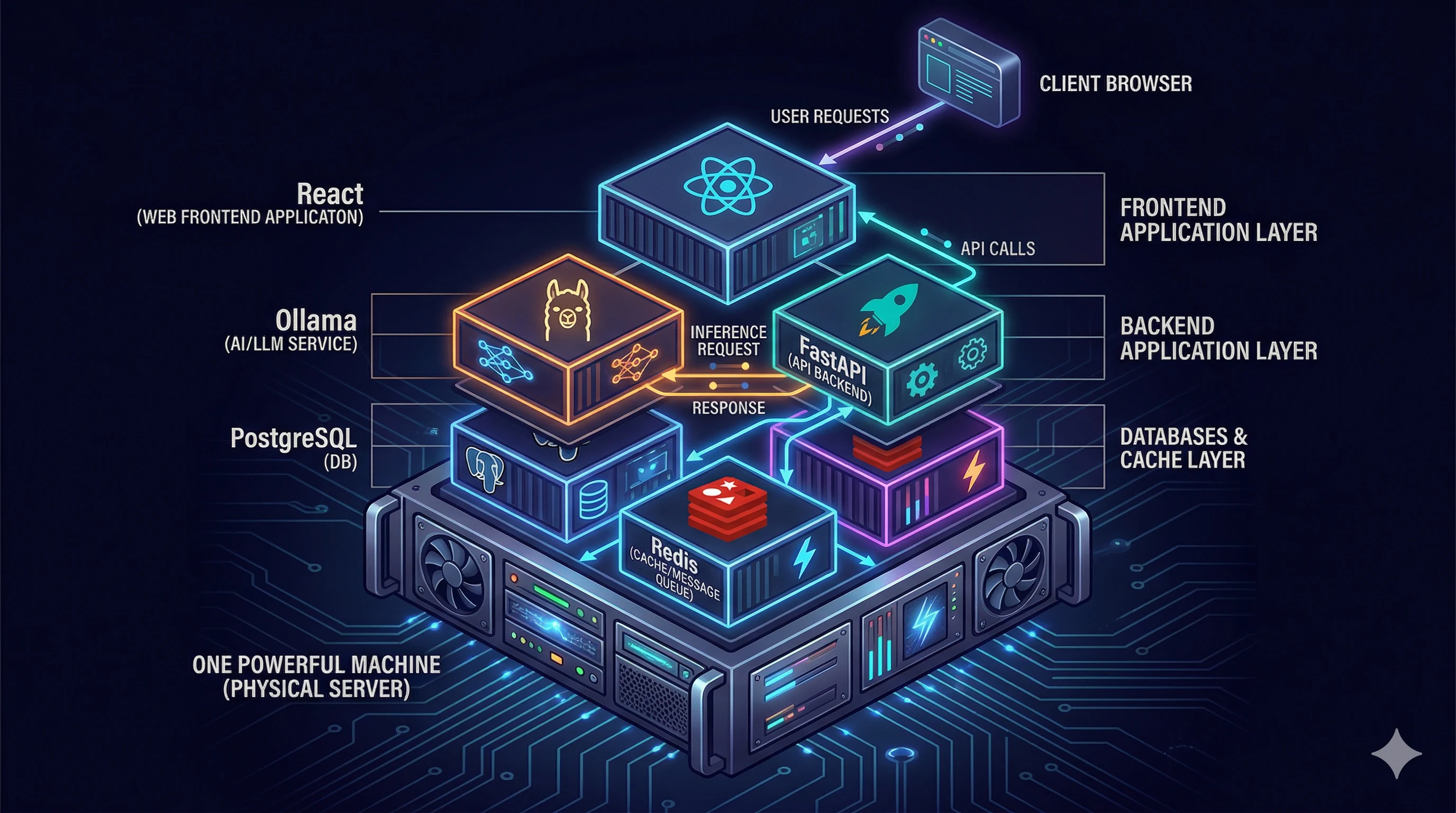
# Step 1: Configure environment variables
cp .env.example .env
# Edit .env with customer-specific values

# Step 2: Build Docker images
docker compose build

# Step 3: Start infrastructure
docker compose up -d postgres redis ollama

# Step 4: Initialize database extensions
docker compose exec postgres bash /docker-entrypoint-initdb.d/init_db.sh

# Step 5: Run database migrations
docker compose exec backend alembic upgrade head

# Step 6: Pull LLM models
docker compose exec ollama ollama pull qwen2.5:14b
docker compose exec ollama ollama pull bge-m3

# Step 7: Start all services
docker compose up -d

# Step 8: Verify
curl -s http://localhost:8000/health | python3 -m json.tool
Kubernetes + Helm 部署
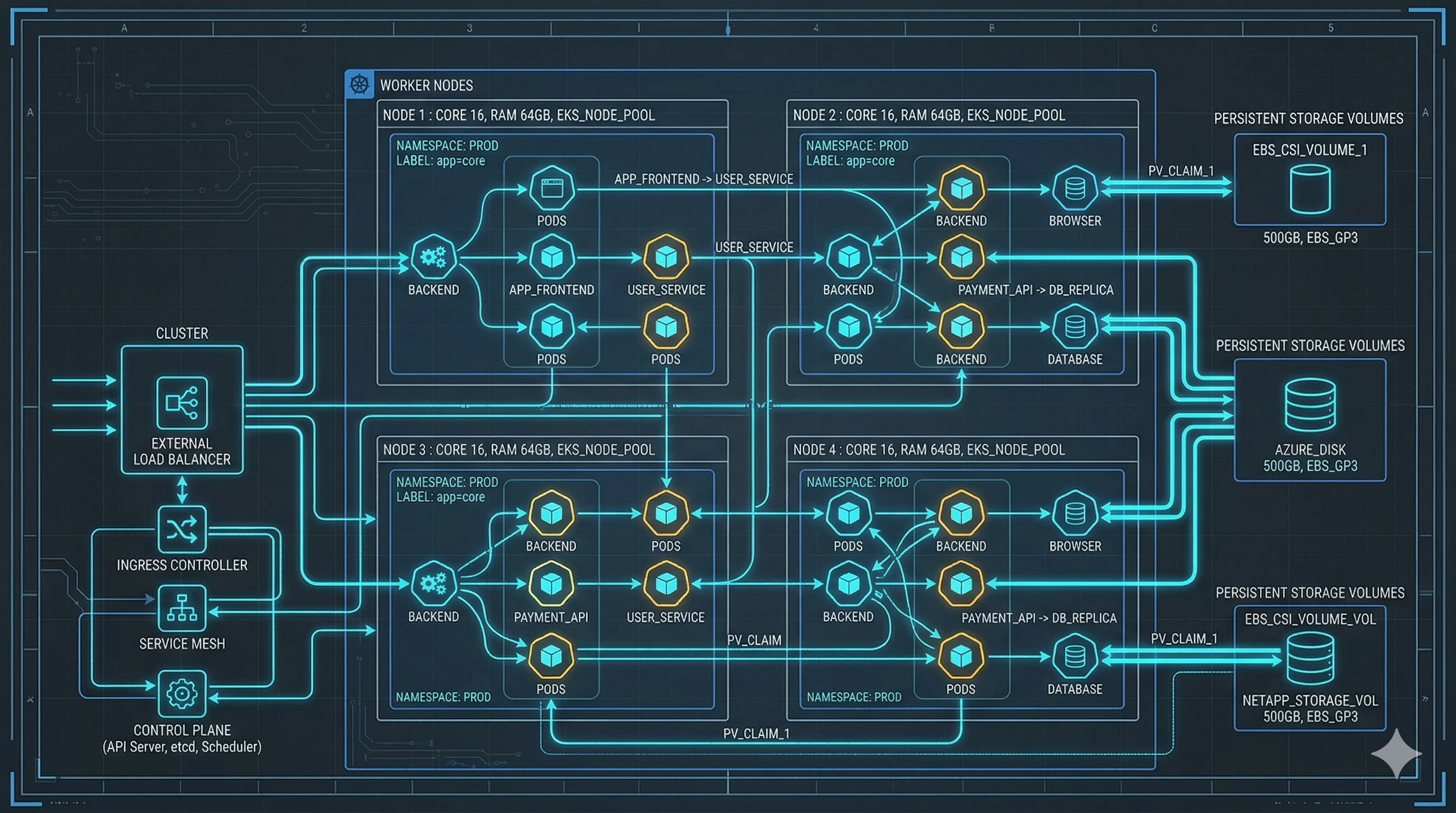
# Configure Helm values
cp deploy/helm/ajna-chakra/values.yaml deploy/helm/ajna-chakra/values-custom.yaml

# Install the chart
helm install ajna deploy/helm/ajna-chakra \
  -f deploy/helm/ajna-chakra/values-custom.yaml \
  --namespace ajna --create-namespace

# Wait for all pods
kubectl get pods -n ajna -w

# Run database migrations
kubectl exec -n ajna deploy/ajna-backend -- alembic upgrade head

# Verify
curl -sk https://ajna.local/health
氣隙離線部署 / Air-Gap Deployment CRITICAL SKILL
Air-gap deployment is THE most critical FDE skill. On-site, you have NO external resources whatsoever.

Step 1: 打包離線安裝包 / Build Air-Gap Package
# Pull LLM models first
ollama pull qwen2.5:14b && ollama pull llama3.1:8b && ollama pull bge-m3

# Build package
cd deploy/airgap
bash package.sh

# Generate checksum
sha256sum ajna-airgap-*.tar.gz > ajna-airgap.sha256

# Copy to encrypted USB drive(s)
Step 2: 現場安裝 / On-Site Installation
# 1. Transfer from USB
cp /media/usb/ajna-airgap-*.tar.gz /opt/
cd /opt

# 2. Verify integrity
sha256sum -c ajna-airgap.sha256
# Expected: OK

# 3. Extract and install
tar xzf ajna-airgap-*.tar.gz
cd ajna-airgap-*/
sudo bash scripts/install.sh

# 4. Monitor startup
docker compose -f /opt/ajna/docker-compose.airgap.yml ps

# 5. Run verification
sudo bash /opt/ajna/scripts/verify.sh
# ALL checks must show PASS

# 6. CRITICAL: Verify air-gap
curl -s --connect-timeout 5 https://google.com
# This MUST FAIL. If it succeeds, STOP and report."Full air-gap deployment from USB to verified running system. Show every step including checksum verification, install.sh execution, service startup monitoring, verify.sh output, and air-gap connectivity check. Record on a clean VM. 20-25 minutes."
監控系統 / Monitoring (Prometheus + Grafana)

Ajna Chakra 核心指標 / Key Metrics
| 指標 Metric | 類型 | 含義 |
|---|---|---|
ajna_http_requests_total | Counter | HTTP 請求總數 |
ajna_http_request_duration_seconds | Histogram | 請求延遲分佈 |
ajna_pipeline_backlog | Gauge | 管線待處理事件數 |
ajna_llm_calls_total | Counter | LLM 呼叫總數 |
ajna_llm_duration_seconds | Histogram | LLM 呼叫延遲 |
ajna_active_websockets | Gauge | 活躍 WebSocket 連線 |
故障排除指南 / Troubleshooting Guide
以下是最常見的 10 個問題。遇到問題時先查閱此表,30 分鐘內無法解決則升級處理。
可能原因: AJNA_DB_PASSWORD 與初始化時的密碼不符。
修復: 檢查日誌 docker compose logs postgres。修正 .env 密碼或刪除 volume 重新初始化(注意:會遺失數據,先備份)。
預防: 初始設置後永遠不要更改 DB 密碼。
可能原因: init_db.sh 安裝時未執行。
修復: docker compose exec postgres bash /docker-entrypoint-initdb.d/init_db.sh
可能原因: 模型未載入、Ollama OOM、模型檔案損壞。
修復: 列出模型 ollama list,缺失則從離線包重新載入。OOM 則切換小模型 (qwen2.5:7b)。
可能原因: Tile 數據不存在或未掛載。
修復: 驗證 /opt/ajna/tiles/ 存在且非空。檢查 compose file 的 volume mount。
可能原因: Enrichment workers 慢於 ingestion 速率(GPU 不足)。
修復: 檢查 redis-cli XLEN raw_ingestion。Scale workers 或使用較小 LLM 模型。
修復: 檢查 Nginx proxy_read_timeout (應為 3600s),確認有 proxy_set_header Upgrade 和 Connection "upgrade"。
修復: 驗證 AJNA_JWT_SECRET 一致性。Secret 變更後所有用戶須重新登入。
修復: 確認 pgvector extension 已載入。VACUUM ANALYZE。檢查 vector index。
修復: df -h + docker system df -v。清理未用映像 docker image prune -f。輪替日誌。歸檔舊備份。
修復: 檢查日誌 grep plugin。Sandbox 自動恢復。反覆當機則停用:curl -X DELETE /api/v1/plugins/<id>。
安全架構概覽 / Security Architecture
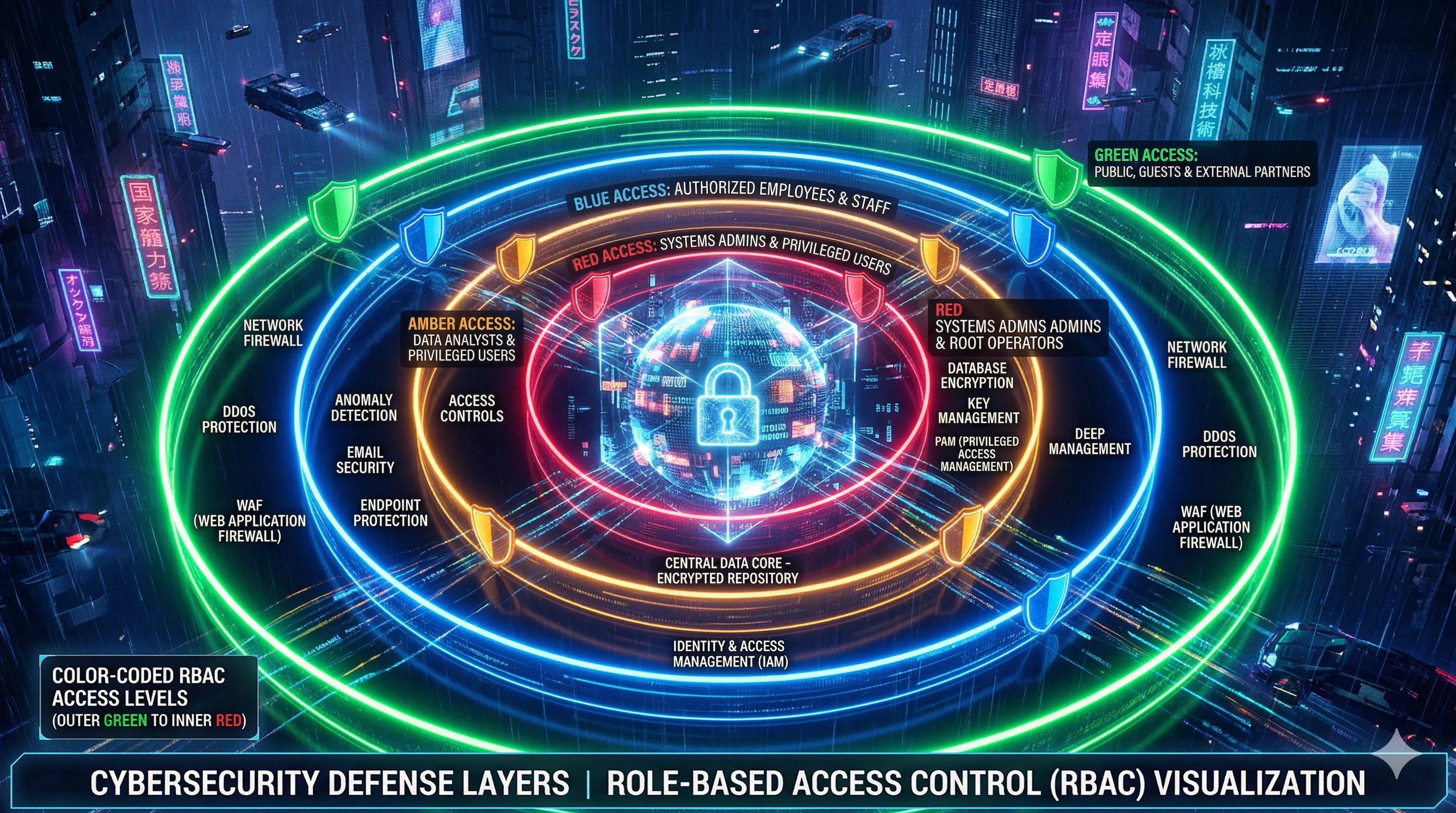
四級分類系統與 RBAC / 4-Tier Classification & RBAC
數據分級 / Data Classification
| 等級 | 中文 | 英文 | 存取角色 |
|---|---|---|---|
| Tier 1 | 公開 | UNCLASSIFIED | All roles |
| Tier 2 | 限閱 | RESTRICTED | ANALYST+ |
| Tier 3 | 機密 | CONFIDENTIAL | SENIOR_ANALYST+ |
| Tier 4 | 極機密 | SECRET | COMMANDER+ |
五層角色階層 / RBAC Hierarchy
只讀
分析操作
進階分析 + OODA
核准決策 + SECRET
全系統管理
審計日誌與 OSINT Gateway / Audit & Gateway Security
AuditMiddleware 記錄所有變更操作:用戶身份、資源類型、操作類型、IP、時間戳。
OSINT Gateway 安全控制
| 域名 Domain | 來源 Source |
|---|---|
www.mnd.gov.tw | 台灣國防部 Taiwan MoND |
data.aishub.net | AIS 船舶追蹤 Maritime tracking |
feeds.reuters.com | 路透社新聞 Reuters |
api.cvedetails.com | CVE 漏洞資料庫 |
安全控制:域名白名單(僅 4 個核准域名)、SSRF 防護(14 個私有 IP 範圍被封鎖)、DNS 重綁定防護、協議白名單、角色限制(ADMINISTRATOR only)、完整審計記錄。
插件開發指南 / Plugin Development Guide
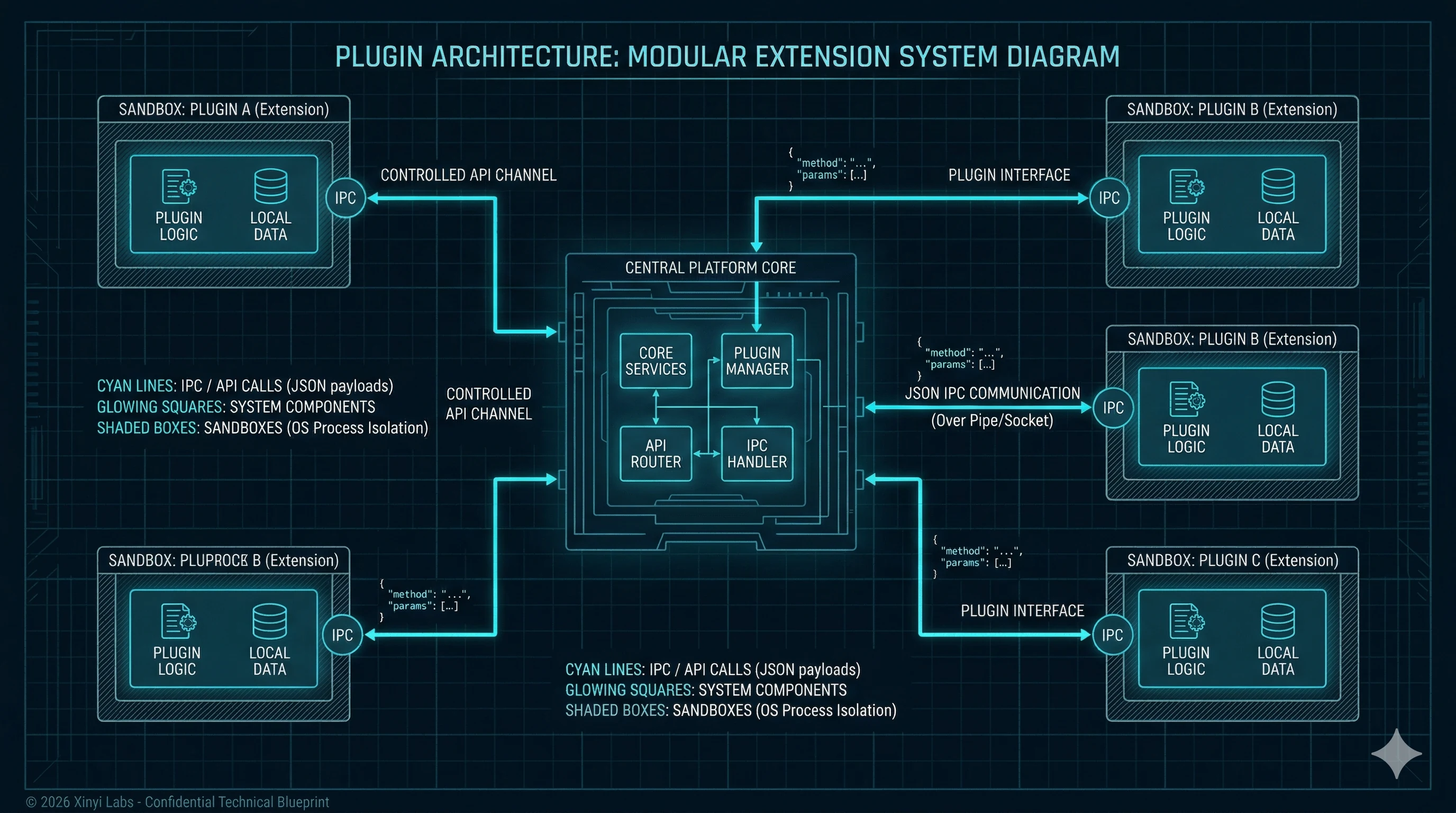
Plugins run in isolated subprocesses; crashes do not affect the core platform.
Plugin Manifest 結構
{
  "name": "custom-connector-example",
  "version": "1.0.0",
  "description": "Example custom data connector",
  "entry_point": "main.py",
  "capabilities": ["db_write", "network"],
  "config_schema": {
    "api_url": {"type": "string", "required": true},
    "poll_interval_seconds": {"type": "integer", "default": 300}
  }
}"Build a custom RSS connector plugin from scratch. Show manifest creation, main.py implementation, JSON IPC, capability declarations, installation via API, and testing. 15-20 minutes."
動手:建立你的第一個插件 / Hands-On: Build Your First Plugin
任務:建立自定義 RSS 新聞連接器插件
- 建立
manifest.json宣告能力 (db_write, network) - 實作
main.py入口點 — 從 stdin 讀取 JSON 請求 - 實作 RSS 數據拉取和轉換邏輯
- 通過 Plugin API 安裝:
curl -X POST /api/v1/plugins/install -F "plugin=@plugin.zip" - 驗證插件已載入:
curl /api/v1/plugins
軍事文化指南 / Military Culture Guide
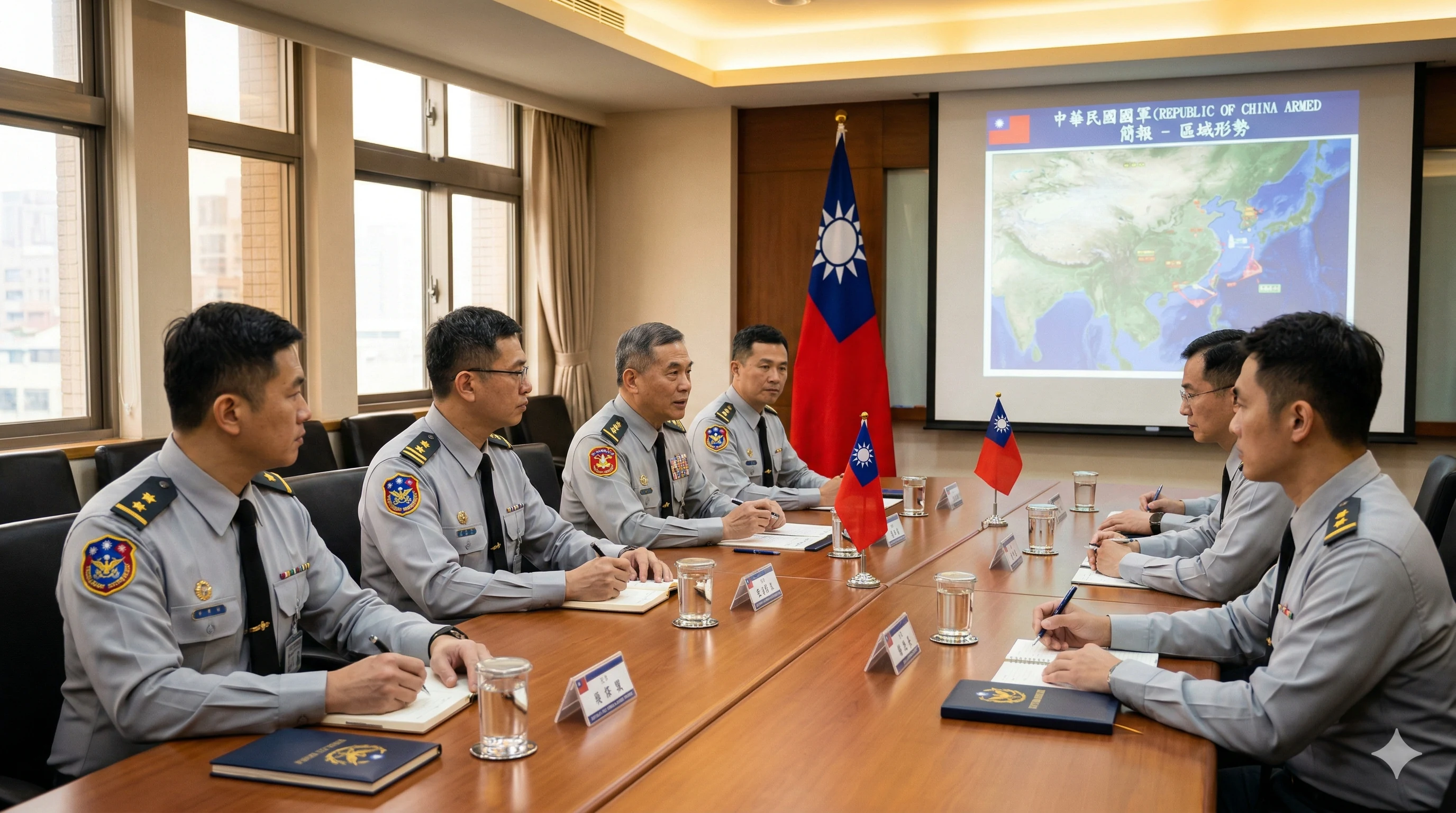
台灣 Taiwan
| 面向 | 指導 |
|---|---|
| 語言 | 繁體中文為官方語言。所有文件、介面預設繁體中文。 |
| 決策方式 | 共識尋求但尊重階層。聯繫人常需「往上呈」才能承諾。 |
| 稱謂 | 永遠使用軍階:處長、上校、少將。未被邀請前不要用名字。 |
| 溝通方式 | 可能間接。「我們再研究看看」常意味「不行」。學會聽言外之意。 |
| 茶文化 | 泡茶是重要的關係建立方式。被邀請時欣然接受。 |
| 準時 | 至少提前 15 分鐘到場。遲到表示不尊重。 |
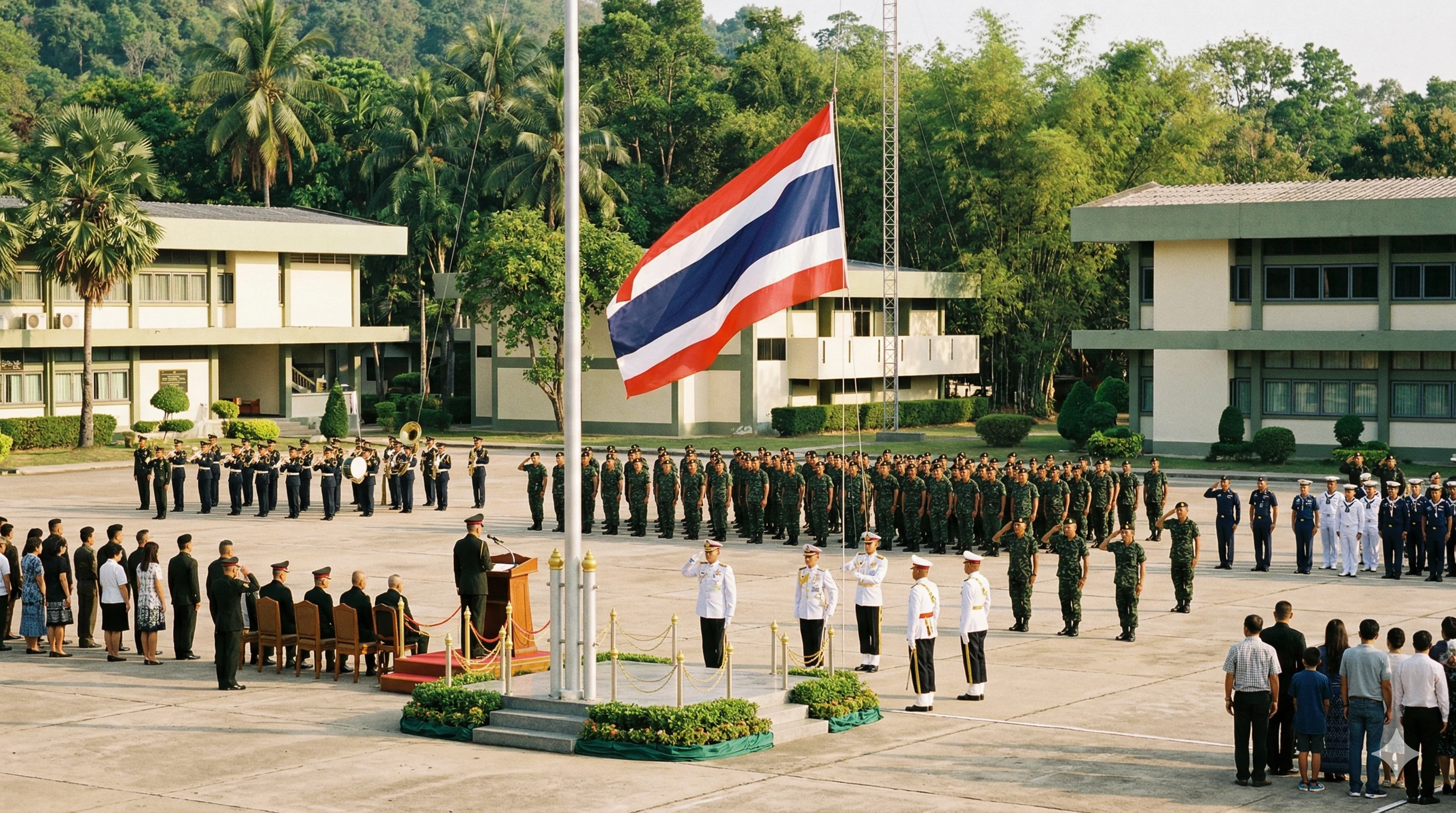
泰國 Thailand
| 面向 | 指導 |
|---|---|
| 關係優先 | 必須先建立信任和關係。第一次會議可能完全是彼此認識。 |
| 面子 | 至關重要。永遠不要公開讓人尷尬。Demo 失敗時自己承擔責任。 |
| 合掌禮 Wai | 學習正確的手位和彎腰程度。做對了表示尊重。 |
| 階層 | 極度尊重資深者。讓他們先進房間、先坐下、先發言。 |
| 王室 | 深受敬仰。絕不隨意評論王室。冒犯君主法律嚴格執行。 |
| 佛教價值觀 | 影響商業文化。謙遜和避免衝突是核心。攻擊性策略會適得其反。 |
溝通技巧 / Communication Techniques

BLUF 格式 / Bottom Line Up Front
Not: "We analyzed the logs and found that the ingestion pipeline was hitting a memory limit due to..."
Instead: "The pipeline is fixed. Root cause was a memory limit. Here's what changed."
用軍事類比解釋技術概念
| 技術概念 | 不好的解釋 | 好的解釋 |
|---|---|---|
| 知識圖譜 | "我們用 Apache AGE 建了圖資料庫..." | "就像您在白板上畫的箭頭和連線,但由電腦自動維護和更新。" |
| 氣隙部署 | "所有容器在沒有外部連線的環境中運行..." | "整個系統完全在您的機房內運行。沒有任何數據會離開您的網路。" |
| 威脅評分 | "我們使用 6 個信號的加權複合分數..." | "系統綜合考慮六個因素計算 0-1 的威脅等級,就像天氣預報的確信度。" |
"Role-play scenarios: demo failure, feature request, hostile IT team, scope creep. Show good vs bad responses. Two FDEs acting out each scenario. 15-20 minutes."
現場部署協議 / On-Site Deployment Protocol
典型兩天部署時間線 / Typical 2-Day Timeline
第一天 Day 1: 硬體設置與基礎安裝
第二天 Day 2: 資料整合、培訓、交付
困難情境處理 / Handling Difficult Situations
衡量 FDE 的標準不是一切順利時的表現,而是出了問題時的表現。
內心:恐慌。外在:冷靜專業。
- 立即承認:「謝謝您發現這個問題。讓我現在立刻調查。」
- 能 5 分鐘內修好就當場修 — 沒有什麼比在壓力下現場解決問題更能展示能力。
- 不能立即修復?精確記錄並給出時程。
- 在承諾時間之前跟進。
- 解決後用簡單語言解釋根本原因。
- 確認需求:「能告訴我更多您會如何在工作流程中使用嗎?」
- 展示目前可用功能。
- 能用插件系統實現?提出時程。
- 需要核心更改?坦誠提交高優先級需求。
- 未確認前永不承諾。
- 保持冷靜。客戶在觀察你的反應。你沉著,他們信任你。
- 清楚且具體地溝通:「[具體組件] 遇到問題。預計解決時間:[時間]。」
- 長時間修復?每 30 分鐘更新狀態。最糟糕的是失聯。
- 解決後進行根本原因分析,透明分享。
- 將此情境添加到故障排除指南。
- 定位為盟友:「我是來幫助你們團隊成功的。你們才是運行這個系統的人。」
- 自由分享知識。讓他們在老闆面前表現出色。
- 在每個決策中納入他們。永遠不要繞過他們。
- 部署後他們應該感到被賦能,而不是被取代。
- 謹慎記錄:確切寫下你發現了什麼、何時、如何。
- 先向團隊主管報告。
- 通過正規渠道溝通(你的 POC 和他們的安全官)。
- 絕對不要在任務範圍之外討論客戶安全問題。
- 不要拒絕,也不要立即同意。
- 確認並調查:「讓我看看我們能做什麼。」
- 小事且能建立善意?就去做。不要斤斤計較。
- 重大事項?提議修改範圍,準備正式提案。
信任方程式 / The Trust Equation
專業能力 Credibility
深入了解產品和國防領域。承認不知道的事 — 「我今天會查明並回覆你」比錯誤答案更有信譽。
可靠性 Reliability
做你說過要做的事,每次,沒有例外。說星期五?星期四就交。說 0900 到?0845 就到。
親近感 Intimacy
記住名字和細節。記住陳上尉的女兒剛上大學。把他們視為人,不僅是客戶。
低自利心 Low Self-Interest
把客戶需求放第一。不推銷不需要的功能。當你真正為他們行事 — 信任倍增。
結業專案 / Capstone Project

The capstone simulates a real customer deployment. Each FDE must complete it solo.
專案內容 / Project Scope
- 氣隙部署 Air-Gap Deploy: 在乾淨 VM 上從 USB 完成完整安裝(全程無外部網路)
- 客製化 Customize: 配置數據源、建立用戶帳戶、安裝自製插件
- 驗證 Validate: 通過所有 verify.sh 檢查,生成 ReACT 簡報,執行 InfoSim 場景
- 培訓 Train: 向評估委員(扮演軍方分析官)進行 30 分鐘培訓演示
- 故障排除 Troubleshoot: 處理評估委員注入的 2 個隨機故障
- 文件 Document: 提交完整的部署後報告
"Training director explains capstone requirements, evaluation criteria, and certification levels. Show examples of excellent vs acceptable vs failing performance. 10 minutes."
認證等級 / Certification Levels

評估標準 / Evaluation Criteria
| 領域 | 權重 | 通過標準 |
|---|---|---|
| 技術能力 Technical | 40% | 氣隙部署成功、故障排除通過、插件開發完成 |
| 溝通能力 Communication | 25% | 培訓演示流暢、BLUF 格式、軍事類比使用得當 |
| 文件品質 Documentation | 15% | 部署後報告完整、格式專業 |
| 問題解決 Problem-solving | 20% | 在壓力下冷靜處理注入故障 |
30/60/90 天目標 / 30/60/90 Day Goals
30 天 / 30 Days
- 完成一次伴隨資深 FDE 的實際客戶部署 / Complete one shadowed deployment
- 獨立完成 Tier 1 氣隙部署(實驗室環境)/ Solo Tier 1 air-gap deploy (lab)
- 通過所有技術能力驗證 / Pass all technical competency checks
60 天 / 60 Days
- 獨立完成第一次客戶 Tier 1 部署 / Solo customer Tier 1 deployment
- 開發至少一個客戶自定義插件 / Develop at least one custom plugin
- 建立一份客戶培訓材料 / Create one customer training document
- 貢獻一個故障排除案例到知識庫 / Contribute one troubleshooting case
90 天 / 90 Days
- 獨立處理第一個 P2 級客戶問題 / Handle first P2 customer issue solo
- 建立與至少一位客戶聯繫人的信任關係 / Build trust with at least one customer POC
- 完成 Senior FDE 認證資格(如適用)/ Qualify for Senior FDE cert (if applicable)
- 指導一位新的 FDE 受訓者 / Mentor one new FDE trainee
快速參考卡 / Quick Reference Cards
DC="docker compose -f /opt/ajna/docker-compose.airgap.yml"
$DC ps — 查看所有服務狀態
$DC logs backend --tail=100 — 查看後端日誌
$DC restart backend — 重啟後端
$DC exec postgres pg_isready -U ajna — 檢查 DB
$DC exec redis redis-cli ping — 檢查 Redis
$DC exec ollama ollama list — 列出 LLM 模型
kubectl get pods -n ajna — 列出所有 Pod
kubectl logs -n ajna deploy/ajna-backend — 查看日誌
kubectl exec -n ajna deploy/ajna-backend -- alembic current
kubectl rollout restart -n ajna deploy/ajna-backend
helm upgrade ajna deploy/helm/ajna-chakra -f values.yaml
pg_isready -U ajna — 檢查連線
pg_dump -U ajna ajna | gzip > backup.sql.gz — 備份
SELECT extname FROM pg_extension; — 列出擴充
SELECT PostGIS_Version(); — PostGIS 版本
VACUUM ANALYZE; — 效能維護
GET /health — 系統健康檢查
GET /api/v1/ontology/objects — 實體列表
GET /api/v1/loop/status — OODA 狀態
POST /api/v1/synthesis/briefings — 生成簡報
GET /api/v1/audit/entries — 審計日誌
GET /api/v1/plugins — 插件列表
GET /metrics — Prometheus 指標
推薦學習資源 / Recommended Resources
| 類別 | 資源 | 備註 |
|---|---|---|
| Python Async | Python Docs: asyncio | 官方文件,必讀 |
| FastAPI | FastAPI Official Tutorial | 完整教學 |
| SQLAlchemy | SQLAlchemy 2.0 Async Guide | 重點:AsyncSession |
| React | React Official Docs (react.dev) | Hook patterns |
| TanStack Query | TanStack Query Docs | 重點:useQuery, useMutation |
| PostgreSQL | PostgreSQL Admin Guide | 備份、監控、效能 |
| PostGIS | PostGIS Introduction | 地理空間基礎 |
| Docker | Docker Official Getting Started | multi-stage builds |
| Kubernetes | Kubernetes Official Tutorials | Pods, Services, Deployments |
| Helm | Helm Official Docs | Chart 開發 |
| Military Intel | JP 2-0: Joint Intelligence | 美軍情報準則 |
| Client Skills | The Trusted Advisor (Maister) | 信任方程式來源 |
軍事術語表 / Military Glossary
| 縮寫 | 全稱 | 中文 |
|---|---|---|
| ADIZ | Air Defense Identification Zone | 防空識別區 |
| AIS | Automatic Identification System | 自動識別系統(船舶) |
| BLUF | Bottom Line Up Front | 結論先行 |
| COA | Course of Action | 行動方案 |
| COP | Common Operational Picture | 通用作戰圖 |
| DIB | Defense Intelligence Bureau | 國防情報局 |
| DTI | Defense Technology Institute | 國防科技研究所(泰國) |
| F2T2EA | Find, Fix, Track, Target, Engage, Assess | 殺傷鏈六階段 |
| MIB | Military Intelligence Bureau | 軍事情報局 |
| MoND | Ministry of National Defense | 國防部 |
| NER | Named Entity Recognition | 命名實體辨識 |
| OODA | Observe, Orient, Decide, Act | 觀察、定向、決策、行動 |
| ORBAT | Order of Battle | 戰鬥序列 |
| OSINT | Open Source Intelligence | 公開來源情報 |
| PLA | People's Liberation Army | 中國人民解放軍 |
| POC | Point of Contact | 聯繫人 |
| RBAC | Role-Based Access Control | 角色存取控制 |
| RTARF | Royal Thai Armed Forces | 皇家泰國武裝部隊 |
| RTN | Royal Thai Navy | 皇家泰國海軍 |
| SIGINT | Signals Intelligence | 信號情報 |
| SSRF | Server-Side Request Forgery | 伺服器端請求偽造 |
部署後報告範本 / Post-Deployment Report Template